
What Happens When Cloud Assessment Gets Ignored?
June 27, 2025



A cloud security assessment helps you detect risks before attackers do. You can’t protect what you don’t see, and the cloud is often filled with blind spots.
According to IBM’s Cost of a Data Breach Report 2024, breached data stored in public clouds incurred the highest average breach cost at USD 5.17 million.
Travis Fielder, VP of Technical Operations at prototype IT, says, “If you’re not regularly reviewing your cloud stack, you’re relying on luck. That’s not a strategy.”
In this blog, you’ll see what could go wrong when you leave cloud risks unchecked. You’ll learn what to include in a thorough cloud assessment, the tools to help you complete it, and how to turn findings into action.
Build a Resilient Cloud Security Strategy!Let’s assess your cloud stack, fix what’s weak, and help you stay compliant without slowing business down. |
Why Every Business Needs a Cloud Security Assessment
92% of businesses now rely on cloud-based solutions. Most businesses now rely on cloud environments for daily operations, data storage, and collaboration. But convenience comes with risk. Cloud platforms evolve fast, and without regular evaluations, your team may miss critical misconfigurations or leave old, vulnerable assets exposed.
Failing to conduct a cloud security risk assessment leads to growing risk and avoidable costs:
- Unnoticed Vulnerabilities Multiply: Without visibility, you lose track of shadow IT, excessive user access, and unused services that increase your risk.
- Security Gaps Cause Compliance Failures: If you manage customer data or financial information, standards like HIPAA, PCI DSS, and GDPR require strict control. Gaps in your controls can result in serious penalties.
- Unmanaged Assets cost More: Over-provisioned resources and misused storage lead to inflated cloud bills. An accurate cloud risk assessment often reveals cost inefficiencies.
A cloud assessment helps you close these gaps, streamline costs, and reinforce compliance. It turns your security from reactive to proactive.
Common Threats Exposed Without a Proper Cloud Assessment
Even mature IT teams miss things in the cloud. Cloud environments are dynamic. Misconfigurations happen, settings change, and unused permissions pile up. A cloud risk assessment checklist helps you identify these risks before hackers exploit them.
Below are real-world issues that surface during most assessments:
- Open Storage Buckets and Ports: Exposed S3 buckets or misconfigured firewalls can allow anyone to access sensitive data. Attackers actively scan the internet for these missteps.
- Over-privileged IAM Roles: Users often get more permissions than they need. Excessive permissions increase the blast radius if credentials are compromised.
- Missing or Weak Audit Trails: Incomplete logging means you can’t see when something goes wrong, or what happened. This undermines incident response and investigation.
- No Tested Incident Response Plan: If your team hasn’t simulated an incident, response time and accuracy will suffer. Many businesses skip rehearsals and rely on theory alone.
These gaps create a false sense of security. A thorough cloud security risk assessment exposes them clearly so your team can act.
Key Benefits of Conducting a Cloud Risk Assessment
A well-structured cloud security assessment offers visibility, accountability, and measurable improvement across your infrastructure. It helps reduce actual risk.
Here’s what your business gains from regular assessments:
- Clear Visibility into Infrastructure: You’ll discover unused workloads, insecure configurations, and outdated services. A clean inventory is your foundation for improvement.
- Stronger Alignment with Compliance: Whether you follow HIPAA, PCI DSS, or GDPR, an assessment checks your controls against known standards.
- Reduced Risk from Third-party Integrations: Vendors with excessive access or poor hygiene introduce new threats. A good cloud risk assessment reviews all integrations.
- Smarter cost control: You’ll identify over-allocated resources, idle machines, or duplicated services. Optimization leads to lower bills and better performance.
| More resources you might like: |
The Cloud Security Assessment Checklist You Shouldn’t Skip
You need a repeatable process that prioritizes real risks to complete an effective cloud security assessment. The checklist below outlines each stage.
1. Define Scope and Objectives Clearly
Start by deciding what to assess. Choose specific accounts, services, or business units. Focus on areas with high-value data or user activity. Clear scope avoids wasted effort and ensures you cover what matters.
2. Review IAM Permissions and Access Controls
Audit every role and user. Ensure permissions match actual job duties. Remove unused accounts and enforce the principle of least privilege. Use time-limited credentials when possible.
3. Scan for Misconfigurations and Vulnerabilities
Forbes reports that misconfiguration errors continue to be the leading trigger for cloud security breaches.
Run automated scans to detect insecure settings, open services, and outdated software. Combine this with manual review for critical assets. Put internet-facing systems first.
4. Verify Data Encryption Standards and DLP
Check that all sensitive data is encrypted in transit and at rest using modern standards like AES-256 and TLS 1.2+. Confirm that DLP tools are identifying and blocking risky data transfers.
5. Validate Incident Response and Logging Mechanisms
Ensure logs are centralized, searchable, and retained according to policy. Simulate an incident to test your response time, clarity, and effectiveness.
6. Evaluate Vendor and Third-party Integrations
According to the HIPAA Journal, over one-third of data breaches stem from third-party security failures. Document all vendor access and review their security controls. Remove connections that are no longer needed. Use contractual obligations to enforce standards.
7. Use Reliable Cloud Assessment Tools
Tools like AWS Config, Azure Security Center, and third-party scanners streamline the process. Pick tools that provide visual dashboards, prioritize risks, and support compliance standards.
Best Practices for Infrastructure Security in Cloud Computing
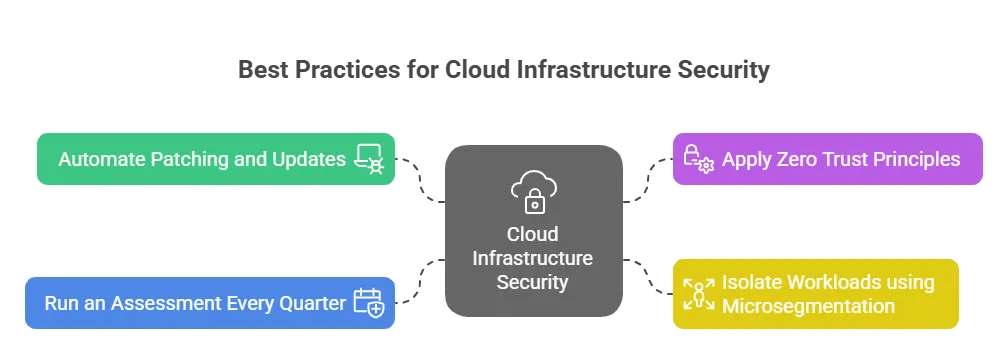
Even with a good checklist, your success depends on how well you execute. These best practices will help you improve the security of your cloud computing infrastructure.
- Automate Patching and Updates: Automate OS and application patching to close known vulnerabilities quickly. This reduces manual work and human error.
- Apply Zero Trust Principles: Require authentication for all connections, even inside your environment. Never assume any user or device is safe by default.
- Isolate Workloads using Microsegmentation: Separate workloads by function and sensitivity. This limits lateral movement if one part is compromised.
- Run an Assessment Every Quarter: Security isn’t static. Frequent evaluations keep your posture aligned with business and threat changes.
Tools That Improve Accuracy in Cloud Security Risk Assessment
Manual assessments take time and often miss fast-changing assets. Use the right tools to streamline the process, improve coverage, and reduce risk.
Here are the top options for your toolset:
- Cloud-native Services: Tools like AWS GuardDuty, Azure Defender, and Google Security Command Center detect misconfigurations and threats automatically.
- Third-party Cloud Assessment Tools: Platforms like Wiz, Orca Security, and Prisma Cloud offer agentless scans and integrate with CI/CD pipelines.
- SIEM Integration: Combine your findings with tools like Splunk or Sentinel for broader visibility. SIEMs help identify attack patterns and prioritize alerts.
These tools don’t replace strategy; they support it. Pick ones that match your cloud platforms and security goals
Building a Remediation Plan
A cloud security assessment is only valuable if you act on what you learn. A remediation plan translates findings into structured improvement.
Start by ranking issues based on severity and business impact.
For each item:
- Assign Ownership: Make someone responsible. Without ownership, problems linger.
- Set Realistic Timelines: Don’t try to fix everything at once. Focus on the top risks first.
- Integrate Fixes into DevOps Pipelines: Make sure that changes stick. Update IaC templates, test policies in staging, and deploy fixes with confidence.
Ongoing Cloud Risk Monitoring and Continuous Improvement
The cloud doesn’t stand still. New services launch, teams change, and attackers adapt. That’s why a single cloud security assessment isn’t enough.
Build a cadence that fits your business:
- Schedule Reviews Quarterly or Semi-annually: Align them with compliance audits, release cycles, or seasonal business changes.
- Track Metrics: Measure average time to resolve vulnerabilities, reduction in high-risk permissions, and number of misconfigurations over time.
- Use Assessments to Educate Teams: Share findings and lessons internally. It helps build a security-first mindset across departments.
Metrics That Matter After a Cloud Security Assessment
A successful cloud security assessment doesn’t end with documentation. To keep your environment secure long-term, you need to monitor key performance indicators that reflect your cloud security posture. These metrics help you track progress, flag recurring issues, and justify the budget for ongoing improvements.
The table below highlights core cloud risk metrics, how to measure them, and what actions they inform.
| Metric | What It Measures | Why It Matters |
| IAM Policy Violations | Number of users or roles with excessive privileges | Reveals misaligned access levels that increase your attack surface |
| Misconfiguration Recurrence Rate | How often same misconfigurations reappear after remediation | Indicates if security training or enforcement controls are lacking |
| Unencrypted Data Transfers | Volume of data moving without encryption in transit or at rest | Tracks non-compliant data flows that put sensitive information at risk |
| Open Ports / Services | Count of exposed ports or services across cloud assets | Helps quantify exposure and enforce better network segmentation |
| Incident Response Time | Time taken to detect, escalate, and respond to cloud threats | Measures operational maturity and identifies gaps in playbooks or monitoring setups |
| Third-Party Risk Exceptions | Number of vendors not aligned with internal security baselines | Highlights risk from external integrations and where new agreements or reviews are needed |
| Compliance Drift | Number of controls failing periodic checks (against CIS, NIST, etc.) | Identifies where continuous compliance checks are falling short |
| Patch Timeliness | Average time to apply critical cloud security patches after release | Tracks whether your patch management strategy is reducing vulnerabilities fast enough |
Secure Your Cloud Stack With Confidence With Prototype IT
A regular cloud security assessment helps you find weaknesses, fix misconfigurations, and reduce risk before someone else exploits them. It’s not just a technical exercise. It’s a business necessity.
Prototype IT delivers structured, tool-assisted assessments with actionable remediation. With over 130 clients across North America, 24/7/365 IT system monitoring, and compliance-first services, our team helps you strengthen cloud security where it matters most.
| Discover Trusted Cloud Services Near You: |
Contact us today to schedule your cloud assessment. Don’t leave your cloud security to chance.
Free Network Assessment:
Get In Touch
- ▶ 401 E. Corporate Dr STE 220
Lewisville, TX 75057 - ▶ 600 W. 6th St Suite 485
Fort Worth, TX 76102 - ▶ 13155 Noel Rd Suite 905
Dallas, TX 75240 - Phone: (214) 270-0850
- Web: https://www.prototypeit.net
