
AI Acceptable Use Policy: Stop Shadow AI Before IT Hits Customer Data
September 18, 2026



Table of Contents
Employees already use generative tools to draft customer emails, summarize invoices, analyze CRM exports, troubleshoot tickets, and clean up documents. According to a 2024 Salesforce survey, 55% of employees reported using AI tools not approved by their organization. An AI acceptable use policy turns that behavior into managed work, reduces shadow AI risks, strengthens AI business security, and makes an AI workplace policy a management priority.
Thad Siwinski, CEO at Prototype IT, notes: “Start with the workflows employees already touch, then define approved tools, blocked data, review steps, and escalation paths before convenience becomes exposure.”
What Should An AI Acceptable Use Policy Include For Daily Workflows
AI rules need to match how work moves through your business, from ticket notes to invoice approvals and CRM updates. An AI acceptable use policy template and AI acceptable use policy examples can help, but the final rules should reflect your infrastructure, user roles, and workflows. Current research found over 4% of GenAI prompts exposed sensitive corporate data.
-
Approved AI tools: Name the tools employees can use for ticket summaries, file sharing, CRM notes, internal drafts, and approved document workflows.
-
Restricted data types: Block customer records, payment data, contracts, credentials, HR files, and regulated attachments from public tools.
-
Required human review: Require review before AI-assisted customer communications, proposals, approvals, or account notes leave the business.
-
Clear escalation paths: Define when staff should open a ticket for unclear use cases, especially when invoices, CRM exports, or shared files are involved.
Risks Of Shadow AI In Email, Files, And Customer Data
Shadow AI often starts as a convenience. An employee pastes customer details into an unapproved tool, summarizes an attachment, or drafts a reply from a personal account because the approved workflow feels slow. Verizon reported frequent AI tool usage surged from 15% to 45% of employees in a single year, making shadow AI security risks a daily issue across email, files, and customer data.
Consider the handoffs: a sales rep uploads a CRM export, accounting summarizes vendor invoices, or a service coordinator pastes ticket details into an AI chat. These actions create shadow AI compliance risks when files contain regulated data, pricing terms, customer history, or approval notes.
The practical answer to what are the risks of shadow AI? is visibility tied to secure mobile access, cloud permissions, and approved communications channels.
We help reduce that exposure through endpoint controls, cloud app governance, identity logs, and SIEM monitoring.
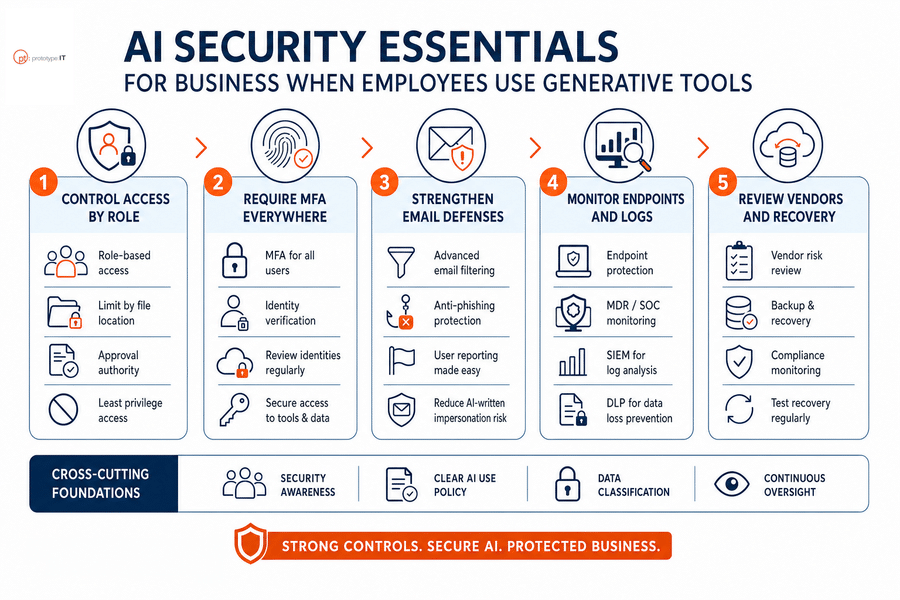
AI Security Essentials For Business When Employees Use Generative Tools
A generative AI acceptable use policy needs controls that protect files, email, identities, and recovery paths, especially when only 37% of organizations have policies to manage AI or detect shadow AI.
-
Control access by role
Limit AI tools by job function, file location, and approval authority so a marketing draft tool cannot reach finance folders or customer payment records.
-
Require MFA everywhere
MFA and identity reviews reduce unauthorized access to AI-connected apps, shared inboxes, and cloud storage.
-
Strengthen email defenses
AI business email security needs filtering, anti-phishing, and user reporting so AI-written impersonation attempts reach fewer inboxes and suspicious messages become traceable tickets.
-
Monitor endpoints and logs
Endpoint protection, MDR, SOC, SIEM, and DLP help trace exposed files, risky prompts, and unusual account activity faster.
-
Review vendors and recovery
Backup and disaster recovery, compliance monitoring, and vendor reviews confirm where data goes, who can access it, and how operations recover when something fails.
Build Safer AI Governance
Advanced Tools For Detecting Shadow AI Risks Across Your Environment
Detection should show where AI use touches endpoints, browsers, cloud apps, email, identities, and file stores. The 2026 Verizon DBIR found that 45% of employees are regular AI users on corporate devices, with 67% using non-corporate accounts.
Tools help, but your team still needs documentation, user coaching, review cadence, and response steps for tickets, file uploads, customer records, and approvals. We tie shadow AI risks and mitigation strategies to proactive monitoring, RMM, log aggregation, SIEM services, and co-managed IT support when internal teams need added capacity. Change is hard, so start with operational steps your teams can repeat.
-
Inventory AI tools: Document approved and observed tools by department, device, browser, cloud account, and business owner.
-
Classify allowed data: Define what an AI acceptable use policy for employees permits for CRM notes, invoices, ticket summaries, customer communications, and file sharing.
-
Monitor unauthorized access: Alert on risky uploads, personal accounts, unusual file movement, and repeated attempts to use blocked tools.
-
Route exceptions cleanly: Create a ticket workflow for manager approval, security review, expiration dates, and follow-up training.
Control Shadow AI Before It Spreads
Prototype IT helps align AI use with your workflows, security needs, and customer data protections.
AI Acceptable Use Policy For Multi-Location Teams
Multiple offices, remote staff, shared inboxes, and mobile approvals require one consistent AI workplace policy with role-specific detail. A branch manager approving a contract, a remote service dispatcher updating tickets, and an accounting lead reviewing vendor invoices do not need identical AI permissions. They need clear boundaries that reduce shadow AI risks without slowing daily work.
-
Structured onboarding steps: During onboarding, our assigned certified PM helps align policy, tools, documentation, and support readiness before service begins.
-
Role-based training: Train users on approved prompts, blocked data, CRM hygiene, customer communication review, and when to ask for help.
-
Manager approval workflows: Define who approves exceptions for campaign data, invoice summaries, shared mailbox drafts, or temporary project needs.
-
Regular account reviews: After onboarding, the dedicated Client Account Manager and dedicated Technical Account Manager support cadence reviews, technical insights, and roadmap planning.
That operating rhythm makes the final policy easier to enforce and easier for employees to follow.
Build Safer AI Workflows With Prototype IT
A strong AI policy protects customer data, reduces unmanaged tool use, improves email and CRM discipline, and gives employees clear rules for productive AI use across documents, tickets, approvals, and customer communications.
We bring customer-first support, end-to-end IT services, integrated cybersecurity, and secure cloud access together so AI business security fits the way your teams already work. Contact Prototype IT to assess current AI use, strengthen security controls, and align policy with workflows your employees can follow.
Explore IT Consulting Services Near You
Free Network Assessment:
Get In Touch
- ▶ 401 E. Corporate Dr STE 220
Lewisville, TX 75057 - ▶ 600 W. 6th St Suite 485
Fort Worth, TX 76102 - ▶ 13155 Noel Rd Suite 905
Dallas, TX 75240 - Phone: (214) 270-0850
- Web: https://www.prototypeit.net
