
The Ultimate Cyber Security Assessment Checklist for SMBs
February 28, 2025



According to Ponemon Institute, 66% of small businesses experienced a cyber attack in the last 12 months.
As Thad Siwinski, CEO of Prototype IT, says, “In our digital market today, data protection isn’t an option—it’s the fundamental shield for business integrity.”
When a single data breach can wipe out years of your company’s progress, it’s understandable to feel uneasy about cybersecurity. Attackers aren’t interested in size—they’re interested in weak points. The good news? You can turn vulnerabilities into strengths with a proactive plan. Below is your roadmap to real protection. Follow it closely, and you’ll be on your way to safeguarding your data, customer trust, and bottom line.
Prevent Catastrophic Downtime!Prototype IT’s proactive cybersecurity solutions safeguard your business 24/7. |
Where Are You Most Vulnerable? (Identify Potential Risks)
Before tackling specific security measures, pinpoint your hidden weak spots. Even minor oversights—like outdated firewall configurations—open doors to data theft. Start by evaluating your network architecture and ensuring that your routers, switches, and wireless access points are configured to recognized standards like the NIST Cybersecurity Framework. Also, don’t overlook physical security: unlocked server rooms or easily accessible workstations can be an open invitation to bad actors.
For a strong foundation, conduct a cyber security risk assessment checklist that includes everything from device inventories to software usage. It’s helpful to schedule regular external penetration tests so you can understand the vantage point of a potential hacker. The goal here is clarity—know exactly where your business stands.
Opinion: Identifying vulnerabilities isn’t paranoia; it’s good business sense. Protecting what you’ve built is far easier than repairing it after a breach.
Who’s Watching Your Data? (User Access & Password Management)
One of the fastest ways into a network is through weak login credentials. If employees reuse passwords or rely on guessable passphrases, attackers can slip in undetected. The solution? A strong access control policy that enforces role-based access—only those who need specific data should see it.
On average, 75% of employees will reset their work-related passwords over a 90-day period, according to CloudSecureTech.
Ramp up security by requiring multi-factor authentication (MFA). This approach adds an extra layer, so even if someone steals a user’s password, they still won’t get in. Also ensure your password policy is aligned with the latest CISA Password Guidance.
For best results, use a password manager to generate complex strings and safely store them. It’s a small measure that can save you countless headaches.
Opinion: Employee convenience often clashes with security, but ignoring robust password practices is akin to leaving your front door unlocked.
| More resources you might like: |
Could a Single Email Sink Your Entire Operation? (Email & Phishing Protocol)
Phishing remains the number one way cybercriminals breach organizations, often tricking unsuspecting employees into clicking malicious links. All it takes is one well-crafted email. That’s why training is non-negotiable; your team should learn how to spot suspicious attachments, spoofed sender addresses, and urgent “act now” wording.
Supplement training with email encryption software to scramble sensitive data and keep it safe from prying eyes. In addition, set up advanced spam filters that quarantine suspicious emails. Regularly schedule mock phishing tests to gauge how employees react under pressure. This creates a culture of vigilance so your people become an active part of your defense.
Opinion: People are often your biggest risk, but with ongoing education, they become your strongest frontline.
Are Your Systems Up to Date? (Patch Management & Software Updates)
Ever wonder why hackers target older operating systems and unpatched software? Because they already know the vulnerabilities. Missing just one security update could mean criminals have a documented roadmap to break in. Make patch management a regular affair, not an afterthought.
Take advantage of automatic updates whenever possible. If you need manual oversight, schedule monthly reviews and test patches in a controlled environment. For additional guidance, consult Microsoft Patch Management or similar resources. Comprehensive patching isn’t optional; it’s the lifeblood of a healthy network.
Opinion: Think of patches like necessary tune-ups for your car. Skipping them is costlier in the long run.
Is Your Data Safe If Disaster Strikes? (Backup & Disaster Recovery)
Cyberattacks, natural disasters, or simple human error can wipe out your data in a blink. A robust backup strategy ensures you won’t lose everything if the worst happens. Aim for a 3-2-1 backup approach: three copies of your data, on two different storage media, with at least one offsite or cloud-based.
Test your backups regularly to confirm they’re recoverable. Embrace solutions recommended by IBM’s Disaster Recovery Overview for advanced storage replication and failover. While you’re at it, build a well-documented disaster recovery plan: define roles, recovery time objectives (RTO), and detailed procedures. Quick action can often prevent a minor glitch from becoming a major crisis.
Opinion: Relying on a single local backup is a gamble that’s rarely worth taking. Redundancy equals resilience.
What’s Your Plan for the Worst? (Incident Response & Reporting)
Even with all the right controls, incidents can still happen. That’s why you need an ironclad incident response plan, detailing everything from how you detect anomalies to how you communicate with stakeholders during a breach. Quick detection and containment often spell the difference between a manageable event and a catastrophic loss.
Use a template from SANS Incident Response Plan to structure the process. Designate clear roles: Who informs leadership? Who speaks to external parties? After each incident, do a post-mortem to identify root causes and lessons learned. This step-by-step plan ensures you’re not scrambling in the heat of the moment.
Opinion: Planning for the worst isn’t pessimistic; it’s a practical approach that accelerates recovery and protects credibility.
Implementing a Threat Assessment Checklist Cyber Security Pros Trust
Security is not static; it evolves with new threats emerging daily. Regularly revisiting a threat assessment checklist cyber security professionals rely on can help you spot fresh attack vectors. This assessment should review new software deployments, vendor relationships, and industry-specific threats. Staying agile is your best ally.
Opinion: A proactive stance on threats today can prevent tomorrow’s crisis from ever unfolding.
Are You Aligned with the Law? (Regulatory Compliance)
Being cyber secure isn’t just about fending off attackers—it’s also about following relevant laws and industry standards. Regulations like the General Data Protection Regulation (GDPR) or HIPAA (in healthcare) impose strict requirements for data handling and breach notifications. Non-compliance can result in hefty fines, legal penalties, and reputational harm.
Establish processes to meet these standards, from secure data storage to timely breach reporting. For instance, if you handle customer data from the European Union, explore official GDPR guidelines to ensure you’re meeting consent, privacy, and data security standards. Regular compliance audits can help you stay on top of changing regulations and keep your business above board.
Opinion: Compliance might feel bureaucratic, but ignoring it could cost more than any proactive measure ever will.
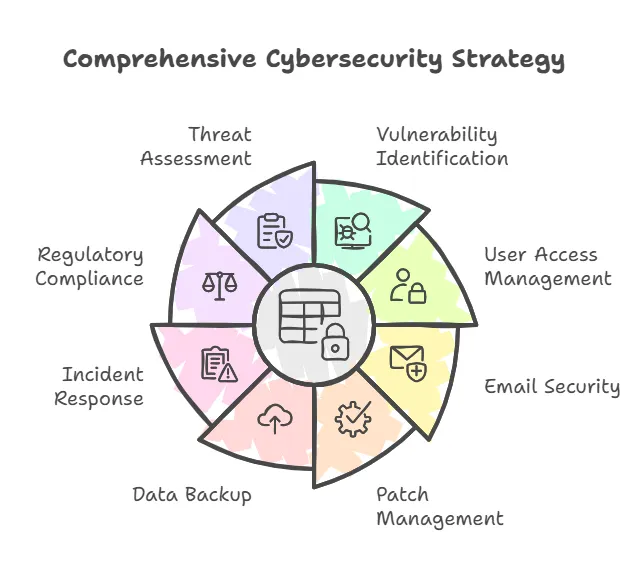
Quick Reference Table: Cyber Security Assessment Checklist
| Checklist Step | Key Action | Why It Matters |
| 1. Identify Vulnerabilities | Scan network & physical security; use NIST guidelines | Uncover hidden weak points before attackers do |
| 2. User Access & Passwords | Enable MFA, enforce strong policies (CISA) | Prevent unauthorized logins |
| 3. Phishing Protocol | Train employees & run mock attacks | Transform staff into a security asset |
| 4. Patch Management & Updates | Automate system/software updates (Microsoft) | Close known vulnerabilities |
| 5. Backup & Disaster Recovery | Adopt 3-2-1 approach, test regularly (IBM DR) | Quickly recover from disasters or breaches |
| 6. Incident Response & Reporting | Draft IR plan, designate roles (SANS IR) | Contain threats & learn from each incident |
| 7. Ongoing Threat Assessment | Regularly update your cyber security risk assessment checklist | Stay ahead of evolving cyber threats |
| 8. Ongoing Threat Assessments | Refresh your cyber security risk assessment checklist regularly | Stay ahead of emerging cyber threats |
Ready to Secure Your Future? Contact Prototype IT Today
Proactive cybersecurity is more than a defensive tactic; it’s a strategic advantage. By identifying vulnerabilities, enforcing strong access controls, educating against phishing, keeping up with patch management, and maintaining solid backup plans, you fortify your operations against a wide array of threats. Planning for incidents and adhering to regulatory mandates ensures you remain resilient and compliant in a constantly shifting landscape. For small and mid-sized businesses, following this Cyber Security Assessment Checklist provides the roadmap to avoid costly breaches.
Prototype IT specializes in helping organizations fortify their cybersecurity posture. Reach out today for a personalized security plan or a consultation on advanced managed IT services.
Get expert support for all your cybersecurity needs. Connect with Prototype IT to explore customized strategies, real-time monitoring, and in-depth threat analysis. Protect your business by calling on the experts who understand how to keep networks safe and operations running smoothly. Schedule your consultation now to stay one step ahead of emerging threats.
| Discover Trusted Cloud Services Near You: |
Free Network Assessment:
Get In Touch
- ▶ 401 E. Corporate Dr STE 220
Lewisville, TX 75057 - ▶ 600 W. 6th St Suite 485
Fort Worth, TX 76102 - ▶ 13155 Noel Rd Suite 905
Dallas, TX 75240 - Phone: (214) 270-0850
- Web: https://www.prototypeit.net
