
Expert Insights on How You Can Reduce The Risks of BYOD
November 28, 2024



39% of employees use personal devices for work. This practice is convenient for both the employee and the employer. BYOD (bring your own device) policies save companies an average of $341 per employee per year, and employees feel more confident using familiar devices. However, BYOD security risks are still a real issue.
“BYOD is increasingly common. Some potential employees may expect you to be able to provide the convenience it brings. So, getting ahead of BYOD’s possible security risks is in your best interest even if you don’t plan to implement a BYOD policy soon.” – Thad Siwinski, CEO of Prototype IT.
If you want to enjoy the benefits of BYOD but are concerned about the risks, all you need is a strategic plan. Your plan must clearly outline what will be on your policy and how your IT team or managed service provider (MSP) will manage your employees’ BYOD devices.
This article is here to help you get started on that process. We’ll share our expert insights on the potential problems with BYOD and how you can get ahead of them. Our advice will include tips on what you should outline for your policy and what you should instruct your IT admins to do.
9 BYOD Risks & What You Can Do About Them
1. Lost or Stolen Devices
Losing a device or having it stolen can expose sensitive data to unauthorized individuals. If the device is not properly secured, the data on it could be accessed, stolen, or even misused. This situation can easily lead to information leaks.
Policy to Enforce
Create a policy requiring employees to use strong passwords and enable device encryption on all personal devices used for work purposes. This policy reduces the risk of unauthorized access by making it harder for anyone who finds or steals a device to access its contents.
What Admins Should Do
IT admins should implement remote wipe capabilities for all devices connected to the company network. With this feature, admins can delete all data from a lost or stolen device to prevent unauthorized access.
Don’t Let Thieves Gain Access to Your Network Through a Stolen DeviceWork with experts who will monitor your IT systems 24/7. |
2. Device Sharing
It’s not uncommon for people to share their personal devices with friends or family members. However, if that personal device holds company data, these friends or family members may inadvertently be granted access to that information.
Policy to Enforce
Implement a policy that restricts device sharing for any devices used for work tasks. Clear guidelines on device usage help employees understand the risks and discourage them from allowing others to use their work-enabled devices.
What Admins Should Do
Set up user profiles that limit access to corporate data on personal devices. By segmenting work and personal profiles, admins can help ensure that sensitive information remains protected even if a device is shared.
3. Malicious Apps
Employees who download unverified apps may unintentionally expose the device and its stored data to bad actors. These apps can compromise a device by collecting personal and company data, displaying intrusive ads, or even spreading malware.
Policy to Enforce
Develop a policy that requires employees to download apps only from trusted sources, such as official app stores. This reduces the likelihood of installing malicious software by ensuring that apps come from reputable sources with better security checks.
What Admins Should Do
Deploy mobile threat detection software that scans devices for suspicious apps. This software can alert the IT team if any malicious or unverified apps are installed, so they can act quickly to protect your company’s data.
| Learn More About Avoiding Data Loss |
4. Unpatched Operating Systems
When employees fail to update their devices, it can leave the device open to attacks that exploit unpatched security vulnerabilities. These vulnerabilities have the potential to spread across your corporate network.
Policy to Enforce
Establish a policy requiring employees to enable automatic updates for their device operating systems. This practice helps ensure that devices receive timely security patches to defend against potential threats.
What Admins Should Do
Monitor device compliance to verify that OS updates are being applied regularly. By checking for compliance, your IT administrators can prompt users to update their systems when necessary.
5. Shadow IT
Shadow IT refers to employees using tools or services that weren’t approved by the IT team. These unvetted tools may bypass your security measures, make it harder to control data flow, and put sensitive information at risk.
Policy to Enforce
Set up a policy that prohibits the use of unapproved applications for work-related tasks. This rule helps to keep all applications and services under the control of your IT department or IT provider.
What Admins Should Do
Monitoring tools are used to identify unauthorized applications being used on the network. This visibility allows your team to address risks directly and provide approved alternatives for employees.
Here are some signs that an application should go on your disapproved list.
| Lacks Encryption | Applications without encryption can expose sensitive data, posing risks to data security. |
| Unrecognized Vendor | Apps from unknown or unverified vendors may lack security standards, making them riskier to use. |
| Frequent Security Vulnerabilities | Applications with repeated or unresolved security issues can lead to potential exploits on the network. |
| Excessive Permissions Required | Apps asking for more access than necessary may compromise privacy and security on devices and data. |
| Non-Compliance with Regulations | Apps that do not meet industry regulations may expose the organization to compliance risks. |
| No Regular Updates | Apps that lack consistent updates may become vulnerable to emerging threats and exploits. |
| Poor User Reviews Regarding Security | Negative feedback from users about security could signal weak security practices within the app. |
6. Use of Insecure Wi-Fi
Public Wi-Fi networks are often unprotected and can expose devices to various security threats. When employees connect to unsecured networks, they risk unauthorized access to data being transmitted over those networks. Since 35% of workers check business emails on a mobile device, there is a higher chance of public Wi-Fi being used to access the content of emails.
Policy to Enforce
Introduce a policy requiring employees to use only secure, password-protected Wi-Fi networks for work activities. This policy can lower the risk of data exposure by reducing reliance on insecure public networks.
What Admins Should Do
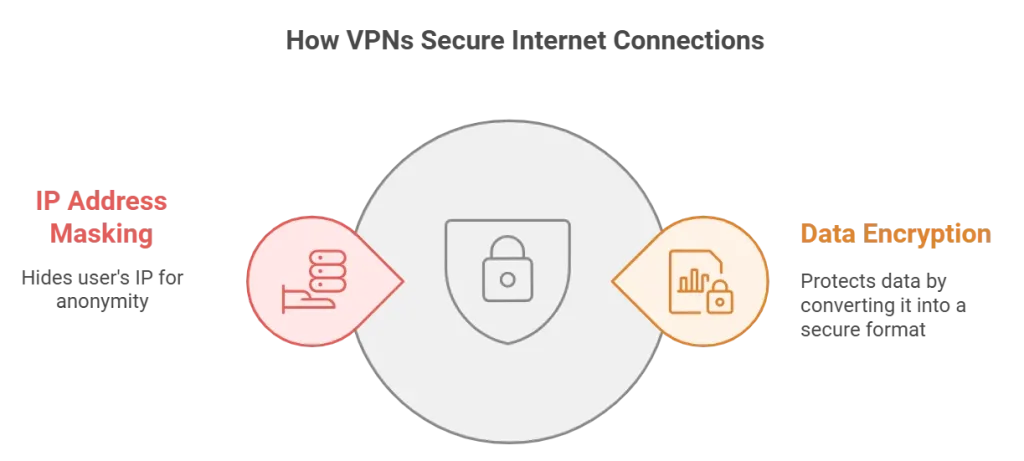
Provide employees with VPN access to secure their internet connections. A VPN encrypts data traffic, which helps protect company data even if employees connect to a less secure Wi-Fi network.
7. Rooted or Jailbroken Devices
Rooted or jailbroken devices are modified to remove restrictions set by the manufacturer and to disable any built-in security features. When employees use these modified devices for work, they expose company data to higher risks.
Policy to Enforce
Create a policy that prohibits the use of devices with altered security settings or unauthorized modifications. Employees may modify devices for greater control over features or to access certain apps, often without realizing the security risks. By restricting the use of modified devices for work purposes, you help ensure that only devices with security protections access data.
What Admins Should Do
Implement device compliance checks that detect rooted or jailbroken devices. Then, your team can block these devices from accessing company resources.
8. Misconfigured Device Settings
Misconfigured device settings can inadvertently expose sensitive data to security threats. Common issues include improper app permissions or unsecured data storage, which can make a device more vulnerable to attacks.
Policy to Enforce
Establish a policy that requires employees to use recommended security settings on all devices. Standardizing settings across devices helps maintain a baseline level of protection and reduces the chance of accidental exposure.
What Admins Should Do
Configure devices through mobile device management (MDM) to enforce secure settings. This approach allows admins to control and update device settings as necessary, ensuring consistency across all devices.
9. Browser Exploits
Browser exploits target vulnerabilities within web browsers. When employees use outdated browsers or visit untrustworthy websites, they increase the likelihood of exposing sensitive data to online threats.
Policy to Enforce
Introduce a policy requiring employees to use only updated browsers and avoid visiting unverified sites for work purposes. This reduces the likelihood of exposing data to malicious websites or browser-based attacks.
What Admins Should Do
Set up content filtering to block access to risky or unverified websites. This proactive measure helps reduce exposure to browser vulnerabilities by keeping employees away from sites that may contain harmful content.
| Ask Our Texas-Based Team How You Can Prevent BYOD Data Breaches | ||
| Dallas | Lewisville | Fort Worth |
Prevent BYOD’s Risks and Issues With Expert Help
If you lack the internal resources to implement all of our suggested security measures, you can count on us for the network and IT support you need. Prototype IT leverages 19+ years of experience to keep your systems secure and block unauthorized individuals from gaining access.
Implement your BYOD policy without security fears by reaching out to us today.
Free Network Assessment:
Get In Touch
- ▶ 401 E. Corporate Dr STE 220
Lewisville, TX 75057 - ▶ 600 W. 6th St Suite 485
Fort Worth, TX 76102 - ▶ 13155 Noel Rd Suite 905
Dallas, TX 75240 - Phone: (214) 270-0850
- Web: https://www.prototypeit.net
